
I have a gaming PC that dual-boots Ubuntu and Windows. It sits in another room, powered off most of the time. I wanted to wake it remotely and choose which OS it boots into — from my phone, from my laptop, from anywhere on my network.
Wake-on-LAN was the easy part. Remote shutdown with OS selection was not.
The Pieces#
| Component | What | Where |
|---|---|---|
| Gaming PC | MSI B650 Edge WiFi, Realtek 2.5GbE, dual-boot Ubuntu/Windows | Physical desktop |
| UpSnap | Wake-on-LAN web UI | Proxmox LXC — 1 core, 512 MB RAM |
| GRUB | Bootloader with grub-reboot | On the gaming PC |
| SSH | Remote command execution | UpSnap container → gaming PC |
The entire control plane runs on a container smaller than most Docker images.
WoL: The Easy Part#
Wake-on-LAN sends a “magic packet” to a MAC address. The NIC sees it, tells the motherboard to power on, and the machine boots. UpSnap gives you a clean web UI for this — add a device with its MAC address and IP, tap a button, machine wakes up.
That took about five minutes to set up. Done.
Shutdown: The Hard Part#
WoL doesn’t know about operating systems. It powers the machine on and GRUB loads whatever’s set as default — in my case, Linux. So how do you boot into Windows?
You change the default before shutting down.
GRUB has a command called grub-reboot that sets a one-time boot entry. It writes next_entry to the GRUB environment block, which persists on disk through a full power-off. On the next boot, GRUB reads it, boots that entry, and clears it. After that one boot, it automatically reverts to the default.
This requires GRUB_DEFAULT=saved in /etc/default/grub and a quick update-grub.
Two Buttons, One Machine#
In UpSnap, I registered two devices with the same MAC address and IP but different shutdown commands:
| UpSnap Device | Wake | Shutdown Command |
|---|---|---|
| Gaming PC — Linux | Magic packet | ssh gaming-pc "sudo shutdown -h now" |
| Gaming PC — Windows | Magic packet | ssh gaming-pc "sudo grub-reboot 'Windows Boot Manager (on /dev/nvme0n1p1)' && sudo shutdown -h now" |
Both wake buttons send the same magic packet. The difference is in the shutdown path. The Linux device just powers off. The Windows device queues Windows as the next boot entry, then powers off.
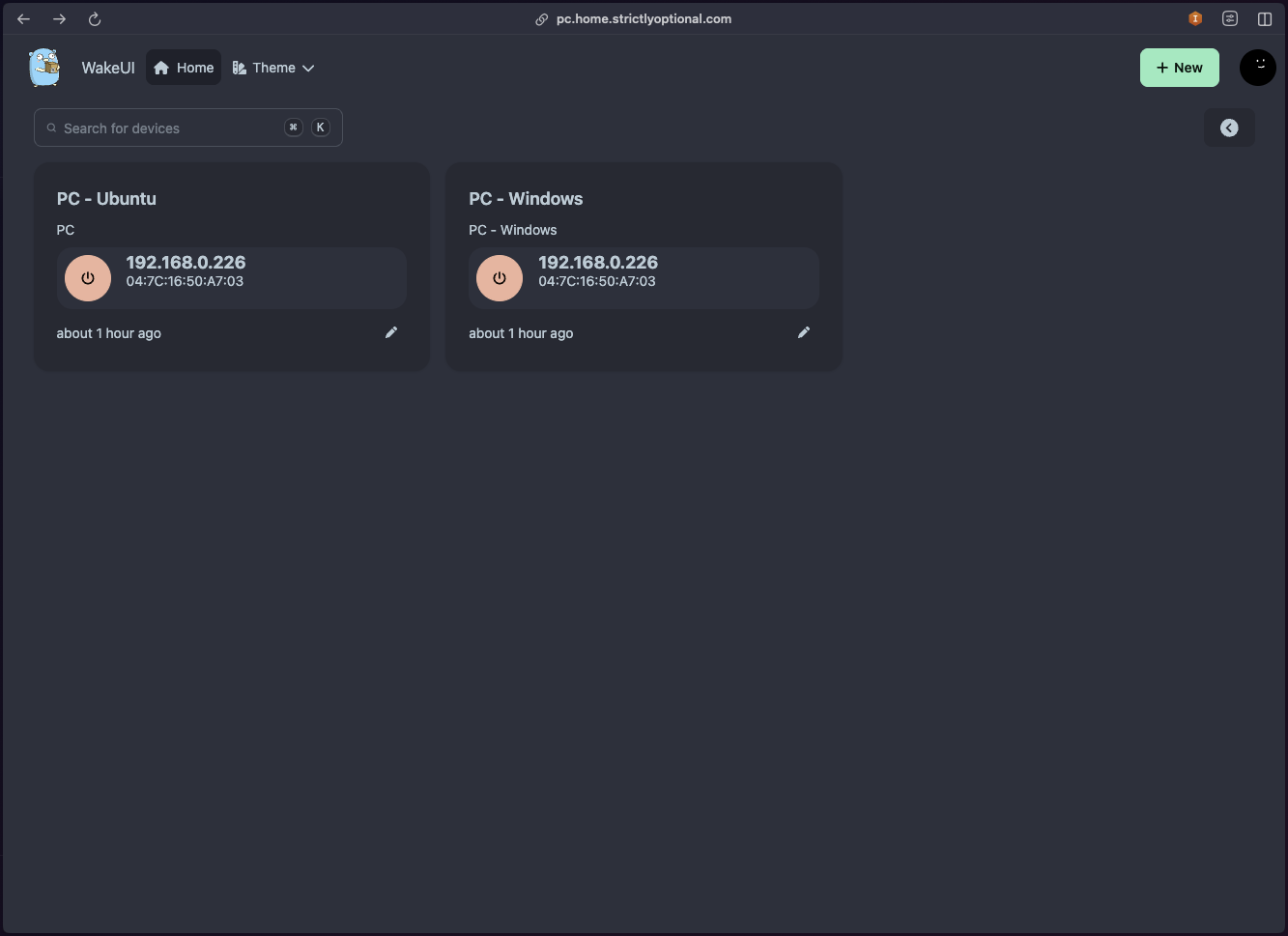
The SSH connection uses a dedicated key pair on the UpSnap container, and the gaming PC has a sudoers file granting passwordless access to just shutdown, reboot, grub-reboot, and ethtool. Nothing more.
How I Use It#
| I want to… | I do this |
|---|---|
| Wake to Linux | Tap “Wake” on either device |
| Wake to Windows | Tap “Shutdown” on PC - Windows, then “Wake” when ready |
| Shut down, stay on Linux | Tap “Shutdown” on PC - Ubuntu |
| Come back from Windows | Just shut down Windows normally — next wake boots Linux automatically |
Five Things That Broke#
The concept took ten minutes to design. Getting it to actually work took considerably longer.
1. Linux Kills WoL on Shutdown#
Linux disables Wake-on-LAN on the NIC during shutdown. Every time. By default, ethtool -s enp12s0 wol g only persists until the next power cycle.
Fix: A systemd service that re-enables WoL on every boot:
# /etc/systemd/system/wol-enable.service
[Unit]
Description=Enable Wake-on-LAN
After=network-online.target

[Service]
Type=oneshot
ExecStart=/usr/sbin/ethtool -s enp12s0 wol g

[Install]
WantedBy=multi-user.target
2. NetworkManager Overrides ethtool#
Even with the systemd service, WoL kept resetting to disabled. NetworkManager has its own WoL settings and silently overrides whatever ethtool configures when it takes over the interface.
Fix:
nmcli connection modify "Wired connection 1" 802-3-ethernet.wake-on-lan magicBelt and suspenders. Both NetworkManager and the systemd service now agree.
3. Realtek Drops to 10 Mbps After Windows Shutdown#
This one was maddening. WoL worked perfectly after Linux shutdowns but failed every time after Windows shutdowns. Same NIC, same cable, same magic packet.
The culprit: Realtek’s WOL & Shutdown Link Speed driver setting defaults to 10 Mbps First. When Windows shuts down, the NIC drops its link speed to 10 Mbps for standby. My switch didn’t reliably detect the renegotiation, so the magic packet never arrived.
Fix: Device Manager → Realtek Gaming 2.5GbE → Advanced → WOL & Shutdown Link Speed → Not Speed Down. Also disabled Green Ethernet, Power Saving Mode, and Gigabit Lite.
4. Windows OpenSSH Hides authorized_keys#
I set up SSH key auth on the gaming PC so the UpSnap container could run shutdown commands without a password. Added the public key to ~/.ssh/authorized_keys. Permission denied.
For users in the Administrators group, Windows OpenSSH ignores ~/.ssh/authorized_keys entirely. It reads from C:\ProgramData\ssh\administrators_authorized_keys instead.
Fix: Add the key to the admin path:
Add-Content -Path "C:\ProgramData\ssh\administrators_authorized_keys" -Value $pub -Encoding ascii5. Two OSes, Two Host Keys, One IP#
Linux and Windows present completely different SSH host keys for the same IP. Every OS switch triggers SSH’s REMOTE HOST IDENTIFICATION HAS CHANGED warning and refuses to connect.
Fix: An SSH config on the UpSnap container that skips host key verification for this specific host:
# /root/.ssh/config
Host gaming-pc
    HostName 192.168.0.226
    User pratik
    IdentityFile /root/.ssh/gaming_pc
    StrictHostKeyChecking no
    UserKnownHostsFile /dev/null
Not ideal for general use, but this is a trusted LAN connection between two machines I own.
The Result#
I open UpSnap on my phone. I see two buttons. I tap “Shut Down” on whichever OS I want next, then “Wake” when I’m ready. The gaming PC boots into the right OS every time. When I’m done with Windows, I just shut it down normally — GRUB auto-reverts to Linux on the next wake.
| What | Detail |
|---|---|
| UpSnap container | 1 core · 512 MB RAM · 2 GB disk |
| Boot to ready | ~30 seconds |
| Maintenance since setup | None |
This setup uses UpSnap — a free, open-source Wake-on-LAN dashboard by seriousm4x. If you’re looking for a clean way to manage devices on your network, check it out.